PeerTube on Storm Buckets
PeerTube can keep its video on object storage. Point it at a Storm Bucket and PeerTube uploads every video and HLS playlist over S3, while viewers stream straight from the bucket's public URL.
This is how NorthTube runs. Its videos live in a Storm Bucket served at northtube.stormsites.ca; the PeerTube instance only holds the database and the web app. Everything below is the same recipe, with placeholders so you can drop in your own bucket.
What you need first
-
A running PeerTube instance, Docker or bare-metal. Installing PeerTube itself
is PeerTube's own guide; this
page is about backing it with Storm Buckets. -
At least one bucket. See Getting Started.
-
An access key for that bucket (the bucket's
alladmin key, or an account
key you have attached to it). See
Managing Access Keys. -
Static hosting enabled on the bucket, and the
stormsites.caURL it gives
you. See Static hosting. This is the URL
viewers read video from, so PeerTube has to know it.
One bucket can hold everything: web videos and HLS playlists live as two prefixes in the same bucket, so it is one Static Hosting toggle, one URL, one line against your pool. Those two carry playback and must be on S3. User exports, original video files, and captions are optional, offload them too, or leave them off and PeerTube keeps that content on the server's local disk.
Configure object storage
PeerTube takes its object storage config from .env environment variables on a Docker install, or from config/production.yaml on bare metal. The builder writes either: pick your install method, type your bucket name, toggle one bucket or a bucket per content type, and copy the result. Basic mode shows the values plain.
PEERTUBE_OBJECT_STORAGE_ENABLED=true
PEERTUBE_OBJECT_STORAGE_ENDPOINT=https://alpha.buckets.stormdevelopments.ca
PEERTUBE_OBJECT_STORAGE_REGION=storm
PEERTUBE_OBJECT_STORAGE_FORCE_PATH_STYLE=true
PEERTUBE_OBJECT_STORAGE_CREDENTIALS_ACCESS_KEY_ID=<your key id>
PEERTUBE_OBJECT_STORAGE_CREDENTIALS_SECRET_ACCESS_KEY=<your secret>

PEERTUBE_OBJECT_STORAGE_WEB_VIDEOS_BUCKET_NAME=<your bucket>
PEERTUBE_OBJECT_STORAGE_WEB_VIDEOS_PREFIX=web-videos/
PEERTUBE_OBJECT_STORAGE_WEB_VIDEOS_BASE_URL=https://<your-subdomain>.stormsites.ca

PEERTUBE_OBJECT_STORAGE_STREAMING_PLAYLISTS_BUCKET_NAME=<your bucket>
PEERTUBE_OBJECT_STORAGE_STREAMING_PLAYLISTS_PREFIX=streaming-playlists/
PEERTUBE_OBJECT_STORAGE_STREAMING_PLAYLISTS_BASE_URL=https://<your-subdomain>.stormsites.ca-
REGION=storm. Storm Buckets uses the regionstorm, not an AWS region
and notgarage. The S3 signature includes the region, so a wrong value fails
the request. -
FORCE_PATH_STYLE=true. Storm Buckets is path-style only
(endpoint/bucket), with no virtual-host DNS. PeerTube defaults to AWS
virtual-host style; without this flag every object request is built as
bucket.alpha.buckets.stormdevelopments.caand fails. -
BASE_URL=https://<your-subdomain>.stormsites.ca. This is the public URL
viewers fetch from, the one Static Hosting gave you. Leave it unset and
PeerTube hands out URLs against the private S3 endpoint, which the public
cannot read. Both storage types point at the same subdomain; the prefix keeps
them apart.
Restart and upload
Restart PeerTube to load the new config, then upload a video:
Docker:
docker compose down && docker compose up -d
Bare-metal (systemd):
sudo systemctl restart peertube
Upload a clip through the PeerTube web UI and let it finish transcoding. In
PeerTube's Administration, then Jobs, you watch the pipeline run:
VIDEO-TRANSCODING jobs transcode on local disk first, then a
MOVE-TO-OBJECT-STORAGE job copies each finished file to the bucket.
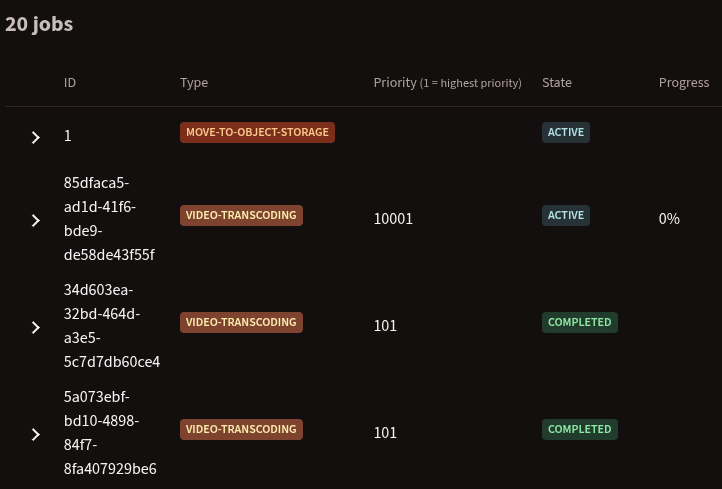
Once the move jobs read COMPLETED, the files are in Storm Buckets.
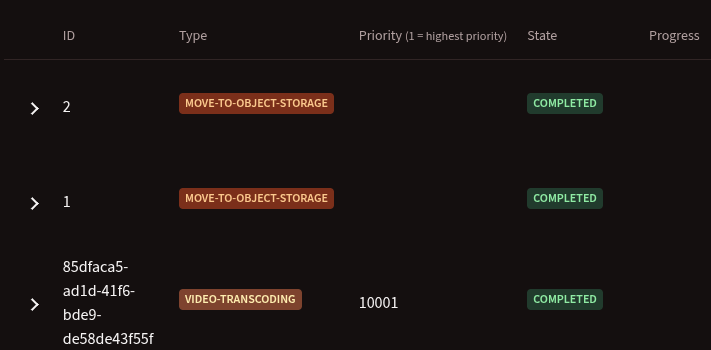
Now open the bucket's Files tab in your Storm Buckets dashboard. You should
see objects under web-videos/ and, once HLS transcoding finishes, under
streaming-playlists/. That is PeerTube writing to Storm Buckets over S3.
PeerTube's default transcoding is HLS-only, so web-videos/ may only hold a
small audio file instead of a playable video. Turn on Web Videos under
Administration → Settings → Transcoding, then re-transcode existing clips to
get standalone MP4s in that folder.
Verify playback
This is the step that proves the setup, not just the config. Play a video back in
a browser. If it streams start to finish, including switching resolutions,
PeerTube is backed by Storm Buckets end to end: it stores over S3, the public
streams over HTTP, and nothing proxies through the app server.
PeerTube's page loads from your instance host, but the video and HLS segments come
from your stormsites.ca URL, so playback is a cross-origin request. Storm Buckets
sets the CORS header on public responses, so HLS loads and switches resolution with
no extra configuration on your side.
Next steps
-
Managing Access Keys to rotate or scope
the key PeerTube uploads with. -
Custom Domains to serve
video from your own domain instead of thestormsites.casubdomain. -
Connecting S3 Tooling for the full
endpoint, region, and client field reference.