Managing Access Keys
Two kinds of key, two jobs:
-
Per-bucket keys scope a credential to one bucket, at one permission
level. Use them for apps, backups, anything that should only reach one
bucket. -
Account keys speak S3 for your own tooling. Point
aws cli,
terraform, or rclone at one to create and manage buckets across your
account.
Neither is a permission matrix. There is nothing to misconfigure into a
wider grant than you meant.
One rule covers both: the secret is shown once, at creation, never
again. Storm does not store it. Lost a secret? Rotate the key. The key ID
stays visible; the secret is replaceable, not recoverable.
Field values for connecting live in
Connecting S3 Tooling.
Per-bucket keys
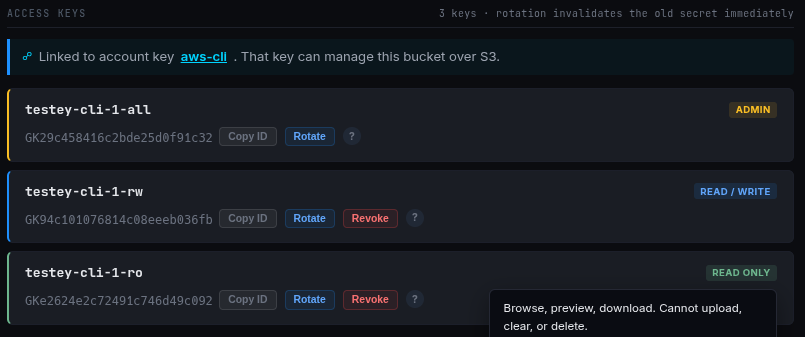
Each bucket carries up to three keys, one per permission level.
-
Admin (RWO): objects, the bucket itself (clear, delete, public
access), and the bucket's keys. -
Read / Write: list, download, upload, and delete objects. Cannot
touch the bucket's settings or keys. For applications. -
Read Only: list and download. For CDNs and integrations.
A bucket you create in the dashboard starts with one admin key. A bucket
created over S3, or landed by an import, starts with no per-bucket keys at
all; the bucket card marks that zero-key state (see
claiming keys).
Generate
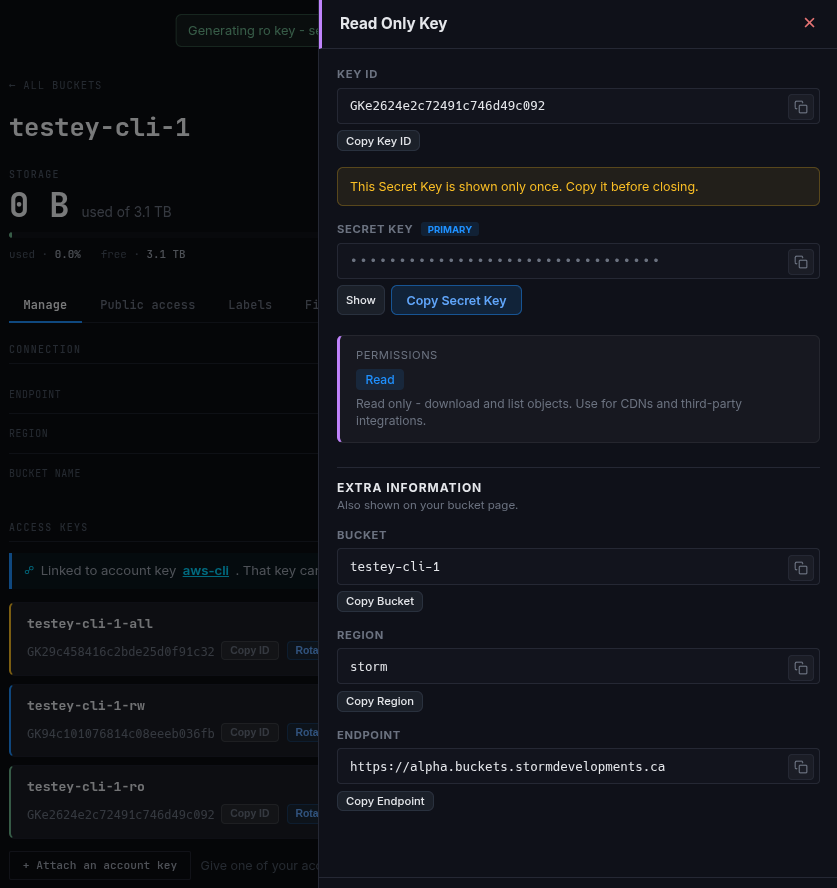
Open the bucket's keys and generate the Read / Write or Read Only key. The
secret shows once. Copy it.
Rotate
Rotation replaces the secret. The old one stops working immediately. Any
tier can rotate, admin included. Confirm with your account password, copy
the new secret, update your apps.
Revoke
Read / Write and Read Only keys revoke outright: the key shows
Revoking... until Storm confirms it's gone from storage, then the slot
clears. The admin key cannot be revoked, only rotated; rotation always
leaves a working key behind.
Any app using a revoked or rotated key loses access immediately.
Account keys
One S3 credential for your own tools, in the same three tiers:
-
Admin creates, owns, and deletes buckets over S3. A root credential
for your storage; treat its secret accordingly. -
Read / Write and Read Only create nothing. They reach only the
buckets you attach to them, at their level.
Every tier starts blind: a fresh key reaches only what it creates (Admin)
or what you attach to it.

Create
Open Account keys, name the key, pick a tier (there is no default:
the blast radius is your call), create. The secret shows once.
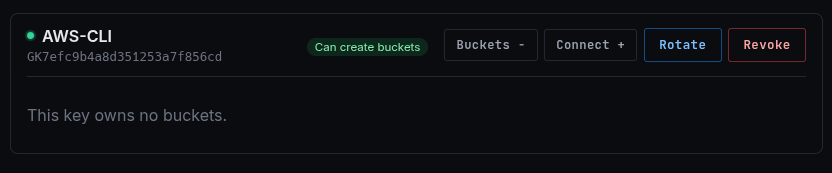
A bucket you create over S3 appears in the dashboard automatically, owned
by the account key.
Rotate
Rotation mints a replacement, moves every owned bucket onto it, then
retires the old key; your buckets are never left ownerless. The retiring
key shows Retiring out and offers no buttons until Storm confirms it's
gone.
If the key may be compromised, the rotate dialog offers "kill it
immediately": the leaked key dies first, the replacement takes ownership
right after. Buckets are briefly ownerless in that window, so leave it off
for routine rotation.
Revoke, and the stranding hazard
An account key is often the only credential on the buckets it created.
Revoking it leaves those buckets with no key at all: the data stays, still
counts toward your storage, but nothing reaches it over S3. Before you
revoke, the dashboard names the buckets at risk and recommends claiming an
admin key on each first.
Linking keys to buckets
The two kinds cross-connect, both directions, both password-gated.
Claiming keys on a zero-key bucket
A bucket created over S3, or landed by an import, has no per-bucket keys.
Open it and claim what you need: Claim an admin key fills the empty
admin slot, or claim a first Read / Write or Read Only key. This is also
the safety move before revoking an account key.

Attaching an account key to a dashboard bucket
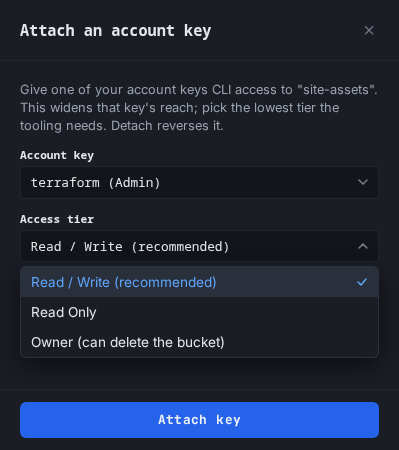
The reverse: give an account key access to a bucket you made in the
dashboard, so your CLI sees it too. Pick the access it gets: read only,
read / write (recommended), or owner. A key attaches at most at its own
tier: a Read-Only key only ever attaches read only. Detach reverses
it, once the bucket has an admin key of its own, so a detach can never
strand a bucket.
Creation paused
Account keys carry a high bucket-count ceiling as an abuse backstop, not a
product limit. Near it, the dashboard warns; at it, new-bucket creation
pauses (Creation paused) while existing buckets keep working. Contact
Storm to raise it.