Account Security
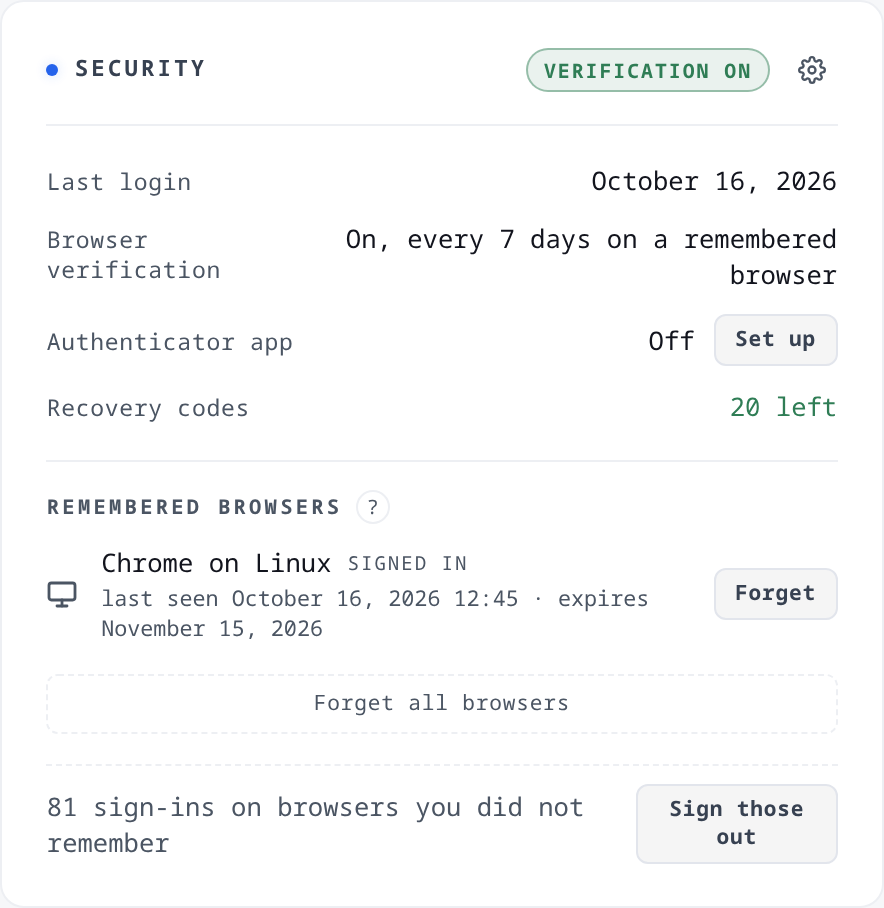
Two places show the same settings. The gear in the navbar opens Settings, and its Security section applies to your account on every browser. The Security card on your profile shows where you stand and has its own gear that opens that section directly.
Your access keys are not on this page and are not affected by anything on it. They authenticate S3 requests and are managed per bucket and per account in the dashboard. Forgetting a browser does not stop a running backup.
What a sign-in asks for
Up to three things, in this order:
-
Your password. Always. Forgot? on the sign-in page resets it through your verified address.
-
Your authenticator app's code, if you set one up. Asked before the email code, so a wrong app code sends no mail.
-
A six-digit code emailed to your verified address. This is browser verification. It is on for every account with a verified address, and setting up the authenticator app turns it off.
A browser you asked Storm to remember skips a code until that code's cadence runs out. A browser you did not remember is asked for every code it owes, every time.
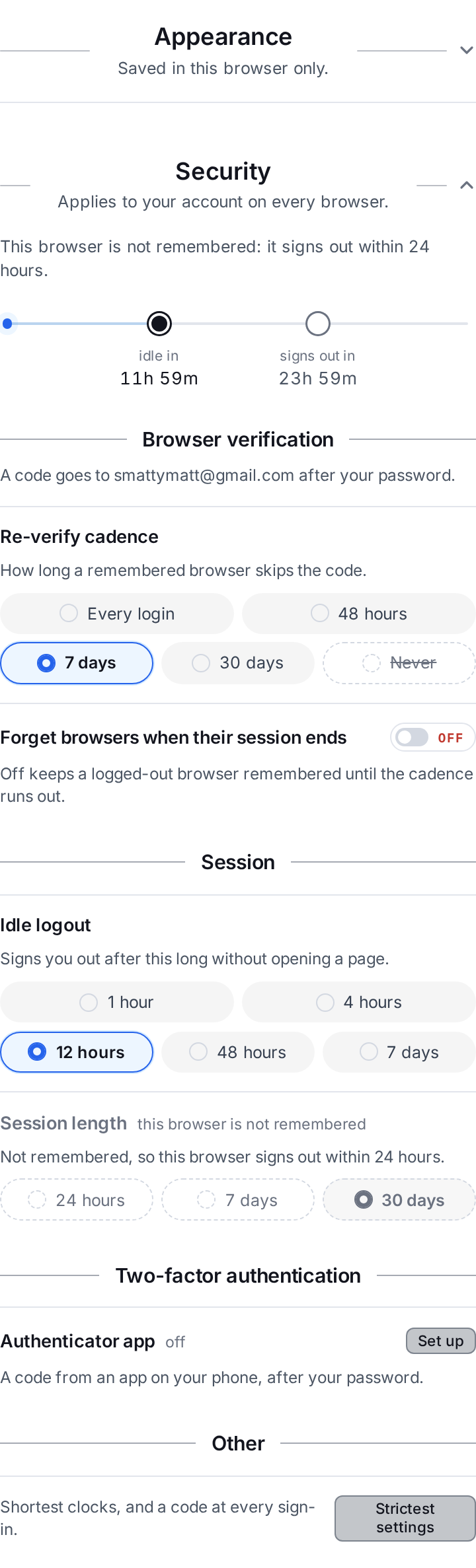
The panel opens on a countdown for the browser you are reading it in: when it goes idle, when its session ends, and when its next code is due.
Browser verification
A code goes to your verified address after your password. Without the app there is no off switch, and an account with an unverified address cannot sign in at all.
Re-verify cadence is how long a remembered browser skips that code: every login, 48 hours, 7 days, or 30 days. It cannot be longer than your session length. The fifth option, Never, is only available with the authenticator app on.
The authenticator app
Off until you set it up. Once on, it is a six-digit code from an app on your phone, asked after your password. Any RFC 6238 app works. Storm recommends 2FAS or Ente Auth.
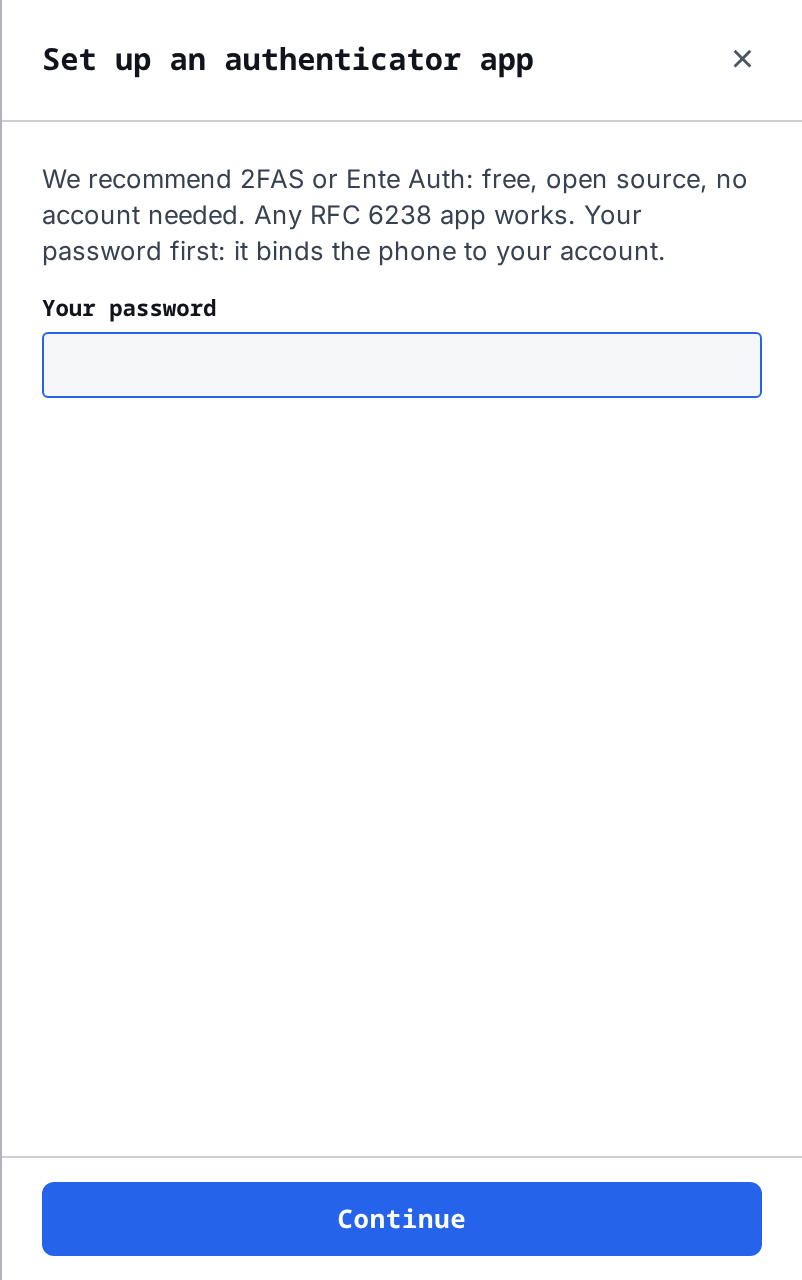
Setting it up costs your password. Storm then shows the secret once, as a QR code and as text, and asks for a code from the app to confirm. The secret appears on no screen afterwards.
Turning it on sets the re-verify cadence to Never, so the email code is no longer asked. Moving the cadence off Never asks you to confirm, and from then on the email code is asked after the app's code.
App cadence is how long a remembered browser skips the app's code: every login, 48 hours, 7 days, or 30 days. It starts at every login. A browser you did not remember is asked for the app's code at every sign-in whatever this says.
Removing the app costs a live code from it, or one recovery code if the phone is gone. Removing it puts the re-verify cadence back to 7 days.
Recovery codes
At your first sign-in after your address was verified, Storm showed you ten recovery codes once and asked you to confirm you had saved them. A set you never confirmed is unusable, and a fresh one is shown at your next sign-in.
Each code works one time, in place of either sign-in code, from More options on the code page. At the app step a recovery code stands in for the app only. A browser that still owes the email code is asked for it next.
A set is issued once. Storm does not reissue it and cannot show it again, because only one-way hashes are stored. The Security card counts what is left and warns at three, at one, and at none. Completing an account recovery issues a fresh set at the next sign-in.
Remembered browsers

At sign-in, Remember this browser for longer sessions is checked. Uncheck it on a machine you do not control.
Checked, the browser joins the list on your Security card, and it skips each code for as long as that code's cadence allows. Each row shows the browser and operating system, whether it is signed in right now, when it was last seen and from which IP address, and when its session expires. Forget signs that browser out and drops its IP address and browser details at once. Forget all browsers does that to every row, and signs out every unremembered sign-in too, including the one you are reading this on.
Unchecked, nothing is remembered: no browser details and no IP address. The session ends when the browser closes, or after 24 hours at the latest, and every code is asked at every sign-in. The card counts these sign-ins, with Sign those out to end them all.
Forget browsers when their session ends is on unless you turn it off. On, logging out or an idle sign-out forgets the browser. Off, a logged-out browser stays on the list until its cadence runs out, its session expires, or you forget it, keeping only its name and dates.
Session length and idle logout
Two clocks, both enforced on every request rather than checked at sign-in.
-
Idle logout signs you out after this long without opening a page: 1 hour, 4 hours, 12 hours, 48 hours, or 7 days. Picking 7 days asks you to confirm, since a stolen session gets the same 7 days. Background polling does not count as you being there.
-
Session length signs you out this long after you signed in, whatever you were doing: 24 hours, 7 days, or 30 days.
A browser you did not ask Storm to remember is capped at 24 hours regardless of what these say, and the panel greys Session length out on it.
Strictest settings
One button under Other. It sets the shortest idle and session clocks and asks for your authenticator app's code at every sign-in. Without an app it asks first, because the strictest option is then the email code at every sign-in, and anyone who can read your inbox can get past that. Undo puts your previous settings back.
Account recovery
If you have lost your inbox and your recovery codes, an access key you have used is the way back. Storm cannot check an S3 signature itself, so the proof is a request the storage node answers.
-
POST /buckets/api/recovery/start/with yourusernameand thekey_id. The answer names an object,storm-recovery-<nonce>. -
Within 15 minutes, make one signed GET or HEAD for that object in any bucket the key can reach. It does not exist, so a request signed with the key's secret gets a 404, and only such a request does.
-
POST /buckets/api/recovery/verify/with the same username, key id and nonce.
A verified proof opens a 48-hour window. The address on file gets a notice with a cancel link, the Security card shows the request with Cancel recovery, and Storm reviews every window and can refuse it. Cancelling rotates the key that signed the request. If nothing cancels it, calling verify again after the window hands you a one-time link to a one-hour session that can do one thing: enter a new address. Clicking the link in that inbox swaps the address, clears the recovery codes, forgets every remembered browser, and tells the old address.
No inbox, no codes, and no key is a permanent refusal. Nobody at Storm can be talked into granting access.
What Storm will not do
-
No self-serve email change. The address on file is the reset channel, so changing it from inside a session that might not be yours would repoint the way back in. It moves only through account recovery.
-
No recovery code answers a Buckets control action. They are the way back into an account, not a stand-in for a check you set on an action.
Defaults, in one place
If you never open Security settings, this is what you have:
| Setting | Default |
|---|---|
| Browser verification | On, and not switchable |
| Re-verify cadence | 7 days |
| Authenticator app | Off |
| App cadence | Every login |
| Recovery codes | Ten, issued at your first verified sign-in |
| Remember this browser | Checked at sign-in |
| Forget browsers when their session ends | On |
| Idle logout | 12 hours |
| Session length | 7 days |
| Unremembered sign-in | Ends with the browser, 24 hours at most |