Control Policies
Control policies decide what you prove before a control action runs:
creating or deleting a bucket, rotating a key, opening a tool. You set
each action on its own. Find them under Control policies in the
dashboard sidebar.
Your access keys and the S3 API are not affected. A key works the same
whatever you set here.
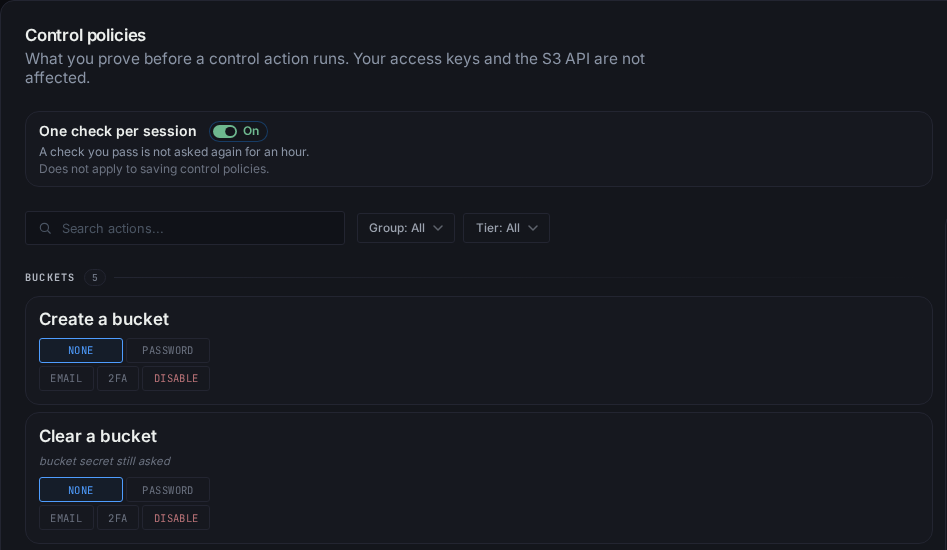
The five choices
| Choice | What happens |
|---|---|
| No check | The action runs. |
| Password | You type your account password first. |
| Email code | We send a code to your verified address. You type it in. |
| Authenticator | You type a code from your authenticator app. |
| Disabled | The action does not run at all. |
Password is something you know, email code is your inbox, the
authenticator is your phone. They are three separate checks, and none
stands in for another.
If you pick Authenticator before you have set up an app, the row says so
and links to setting one up. The action asks for it once you have.
The actions
Buckets: Create a bucket, Clear a bucket, Delete a bucket, Download
bucket data, Change CORS rules.
Bucket keys: Generate a bucket key, Attach an account key at admin,
Attach an account key, Detach an account key, Claim the first key on a keyless
bucket, Rotate a bucket admin key, Rotate a bucket key, Revoke a bucket key.
Account keys: Create an admin account key, Create an account key, Raise
an account key, Lower an account key, Rotate an admin account key, Rotate an
account key, Revoke an account key.
Tools: Open the Import tool, Open the Backup tool, Open the file
browser, Change static hosting.
Search the board by name, or narrow it by group and by check.
Defaults, and the limits
A new account changes nothing: nine actions ask for your password, and
everything else is No check. Raise any of them.
Nine actions never go below Password: claiming the first key on a
keyless bucket, attaching an account key, rotating a bucket key, raising an
account key, rotating an account key, and the four admin rows beside them.
Each of them hands out access. Lowering an account key has no floor: it
only takes reach away.
Eight actions cannot be Disabled: claiming the first key, both rotates
and both admin rotates, lowering an account key, and both revokes. They are
how you get back into a bucket or cut off a leaked key, so turning them off
could strand you. Attaching an account key can be Disabled, and so can the
three ways to a new admin key (creating one, raising a key, attaching at
admin), so you can stop new admin keys outright. Disabling the raise stops
every raise, read-only to read-write included.
Some rows read bucket secret still asked. That check belongs to the
action itself and stays whatever you pick here. A policy adds to it,
never replaces it.
Saving changes
Every save asks for your password. Making a check weaker also asks for
the check you are leaving: moving an action off Authenticator asks for an
authenticator code. Turning an action back on from Disabled asks for the
strongest check your account has.
A weaker save signs out your other browsers. Raising a check signs out
nobody.
If the policies changed on another device while you were editing, the
save stops, the board reloads, and your edits stay on top for you to
check and save again.
One check per session
On by default. When you pass a check, the same check is not asked again
for an hour in that browser session. Rotating ten keys asks once.
-
The hour counts from the check, not from your last click.
-
Each check counts on its own. A password does not stand in for an
authenticator code. -
Signing in does not count. Only a check you pass here does.
-
Signing out, or your session ending, starts over.
-
Any saved policy change starts over, on every device.
It does not apply to saving control policies. Those always ask.
Turn it off for a check every time. Turning it back on counts as making
things weaker, so it asks for your password and your strongest check. It
signs nobody out.
Tools
Import, Backup and static hosting ask once, on the first change you make.
Looking around never asks. The file browser asks when you open it. A tool
then stays open while you work in it, and asks again after 15 minutes
without you using it.
When an action is Disabled
Its button is greyed out and says why.
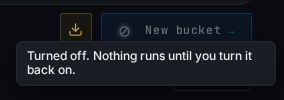
Asked for anyway, the action answers You turned this off in Control
policies. and nothing runs.
With Create a bucket disabled, Import and Backup still work into
buckets you already have. They cannot make a new one.
Not covered
-
Requests signed with your access keys, from the AWS CLI, rclone, a
backup job or your own code. Keys are their own control: see
Managing Access Keys. -
Signing in, and your account's sign-in security. Those live on your
profile.