Framing Rules
A framing rule decides which websites may show your bucket's files inside
their own pages, in an iframe. Use it to let your app preview a file in
place, or to stop every other site from doing so.
The three states
| State | What it does |
|---|---|
| Any site | Any website may frame the bucket's files. The default. |
| Only these sites | Only the websites you list may frame them. |
| No site | No website may frame them. |
The dashboard's own preview in Files keeps working under every state,
No site included.
Set a rule
Open the bucket, then Manage > Advanced Options. Framing rules
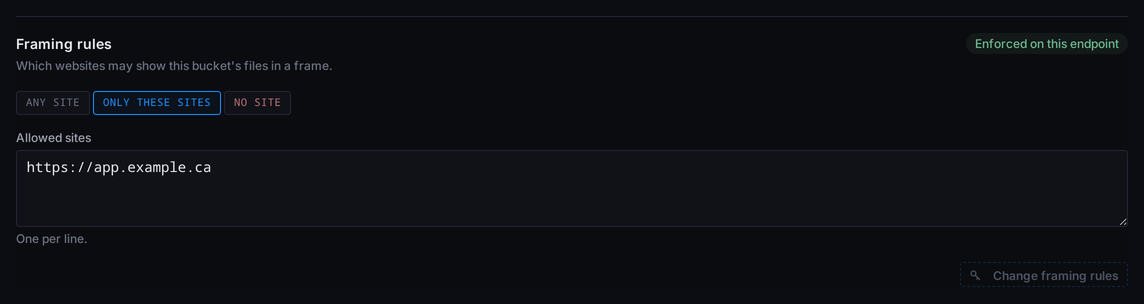
sits below the CORS rules. Pick a state; for Only these sites, put one
site per line in Allowed sites, then save with Change framing rules.
The save has its own Control Gate,
never weaker than Password, like a CORS change.
The save sends the rule to the endpoint with Storm's next policy update.
The badge beside the control shows Enforced on this endpoint when every
node behind the endpoint applies framing rules, or Stored, not enforced
yet on this endpoint when one does not yet. Stored rules wait in your
account and apply once it does.
Example
Your app at https://app.example.ca shows a PDF from the bucket in an
iframe through a presigned URL. Under Any site, the default, that preview
already loads and you need no rule. To make sure only your app can frame the
file, pick Only these sites and list the site the page is served from, not
the bucket's:
https://app.example.ca
Your app's preview loads. Once the badge reads Enforced on this endpoint,
a page on any other website that frames the same URL is blocked by the
visitor's browser, and a successful read carries:
Content-Security-Policy: frame-ancestors https://app.example.ca
Check it against a presigned URL with a GET that prints only the headers:
curl -s -D - -o /dev/null "<presigned-url>"
Not curl -I: that sends a HEAD request, and a URL presigned for GET answers
it 403 with no header.
Reference
Allowed sites
Each line is a scheme and a host, with an optional port
(https://app.example.ca:8443), and nothing else: no path, no trailing
text. Wildcard hosts (https://*.example.ca) are refused. A bucket holds
up to 32 sites.
What a rule covers
Files read through the S3 endpoint. Hosted sites and custom domains are not
covered: they keep their own fixed setting, under which a hosted site's
pages can be framed only by that same site.
Only a successful read carries the header. A refused or missing file
answers without it, so the rule is never read back to someone without
access.
What a rule is not
A framing rule grants no access. A site you list still needs a valid key or
a presigned URL to read anything, and Any site opens nothing to a
visitor without one. For which websites may call the bucket from a browser,
see CORS Rules.